
-
ORBITER-FORUM will be temporarily closed at 2026-07-23 18:00 UTC while we complete some OF maintenance tasks. The amount of downtime is expected to take up to one hour, but probably less.
You are using an out of date browser. It may not display this or other websites correctly.
You should upgrade or use an alternative browser.
You should upgrade or use an alternative browser.
New Release D3D9Client Development
- Thread starter jarmonik
- Start date
Fresnel reflection is not supposed to reflect black space like that, only metallic reflections are.
In real life, Fresnel reflections do act that way, the same way as metallic reflections. If you pick up a smooth non-metallic object that has a Fresnel reflection (like a credit card) and look at it edge-on, it reflects the environment behind it (both light and dark) as the angle goes to zero. Even a white object like a smooth dinner plate becomes dark when viewed edge-on against a dark background.
Here are some photos of Fresnel reflections on aircraft to illustrate.
http://cdn-www.airliners.net/aviation-photos/photos/1/2/9/2237921.jpg Notice the reflection of the horizontal stabilizer toward the rear of the aircraft.
http://cdn-www.airliners.net/aviation-photos/photos/4/1/6/2203614.jpg Notice the change in reflection of the woods, at the front of the aircraft and progressing towards the rear.
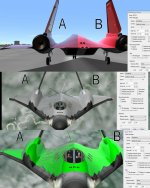
In the posted Orbiter screenshots, the difference is shown between using cRefl.rgba ("A") and cRefl.rgb ("B") at three different settings. "A" looks more realistic than "B".
Attachments
Dear community,
I can not get the video tab to appear in the menu of the orbiter_ng launchpad. I've read somewhere that the video tab should appear after one selects the D3D9Client checkbox under modules. Well, it just doesn't. I'm using WinXP 32bit on a AMD XP1700 (perhaps the problem is the lack of latest SSE?), June2010 DirectX runtime and the latest D3D9ClientR10.zip.
Please help, otherwise the orbiter itself runs excellent with sound package too.
Cheers!
I can not get the video tab to appear in the menu of the orbiter_ng launchpad. I've read somewhere that the video tab should appear after one selects the D3D9Client checkbox under modules. Well, it just doesn't. I'm using WinXP 32bit on a AMD XP1700 (perhaps the problem is the lack of latest SSE?), June2010 DirectX runtime and the latest D3D9ClientR10.zip.
Please help, otherwise the orbiter itself runs excellent with sound package too.
Cheers!
jarmonik: Is there any way yo could give the planet-shine a boost in the light level? Currently, it's too dark when compared to real photos/videos.
There's a Planet Glow setting under the "Advanced" button of the Video tab. It gives you lots of settings you can adjust for D3D9. I think planet glow is normally set to 0.5, but I prefer it brighter too, and set it to 0.75.
Last edited:
- Joined
- Feb 4, 2008
- Messages
- 9,758
- Reaction score
- 1,028
- Points
- 203
I have it at max 1.0 and it is still too dark. Compare it a photo such as this one of Endeavour during STS-134: http://spaceflight.nasa.gov/gallery/images/shuttle/sts-134/hires/s134e006936.jpgThere's a Planet Glow setting under the "Advanced" button of the Video tab. It gives you lots of settings you can adjust for D3D9. I think it's normally set to 0.5, but I prefer it brighter too, and set it to 0.75.
- Joined
- Mar 28, 2008
- Messages
- 2,707
- Reaction score
- 881
- Points
- 128
In real life, Fresnel reflections do act that way, the same way as metallic reflections. If you pick up a smooth non-metallic object that has a Fresnel reflection (like a credit card) and look at it edge-on, it reflects the environment behind it (both light and dark) as the angle goes to zero. Even a white object like a smooth dinner plate becomes dark when viewed edge-on against a dark background.
In the posted Orbiter screenshots, the difference is shown between using cRefl.rgba ("A") and cRefl.rgb ("B") at three different settings. "A" looks more realistic than "B".
Ok, I agree.
PHP:
cRefl.rgba = cRefl.rgba * (1.0f - fresnel) + fresnel;
PHP:
cRefl.rgba *= fresnel;Would that be a better approximation ? But how does it work with reflection maps ?

- Joined
- Feb 7, 2008
- Messages
- 422
- Reaction score
- 105
- Points
- 43
I have it at max 1.0 and it is still too dark. Compare it a photo such as this one of Endeavour during STS-134: http://spaceflight.nasa.gov/gallery/images/shuttle/sts-134/hires/s134e006936.jpg
DaveS, 1.0 is not the maximum value, you can crank it up even more to your liking, here's a screenshot with Planet glow value at 2.0
Last edited:
I have it at max 1.0 and it is still too dark. Compare it a photo such as this one of Endeavour during STS-134: http://spaceflight.nasa.gov/gallery/images/shuttle/sts-134/hires/s134e006936.jpg
Yes, it looks bright. However, the sunlit side (not shown) of the Shuttle in your photograph will be much brighter than the side illuminated by Earth. Unless HDR (high dynamic range) rendering is implemented, with an adjustable "iris" for the camera, lighting will never look perfectly correct.

- Joined
- Apr 13, 2011
- Messages
- 2,215
- Reaction score
- 0
- Points
- 36
- Location
- Los Angeles
- Website
- www.youtube.com
I think the more important thing is to look at relative brightness. How bright is the payload bay compared to the brightness of the Earth.
The try and get that same ratio in Orbiter. Trying to get it to look just like this STS-134 pic wouldn't work because the Earth in that pic appears to be quite a bit brighter and exposed than it appears in Orbiter at the moment.
I tried it with 1.00 last night....I think that is close, it might be a bit too much, I don't want to run into a problem where it looks like the Earth Shine/Glow is illuminating the ship with more light than is available.
The try and get that same ratio in Orbiter. Trying to get it to look just like this STS-134 pic wouldn't work because the Earth in that pic appears to be quite a bit brighter and exposed than it appears in Orbiter at the moment.
I tried it with 1.00 last night....I think that is close, it might be a bit too much, I don't want to run into a problem where it looks like the Earth Shine/Glow is illuminating the ship with more light than is available.
In that case the material "reflect" property would need to be set to [1,1,1] by default. Setting the fresnel "offset" to 1 would create a mirror like reflection and setting both "offset" and "multiplier" to zero would disable reflections.
Would that be a better approximation ? But how does it work with reflection maps ?
If the reflect property is set to [1,1,1] by default, then that would be the same as saying cRefl.rgba = fresnel. The reflection map would not be able to control reflections. We still want to use the data in cRefl, so maybe we could instead use cRefl as part of the Fresnel calculation, i.e. using cRefl as the gMtrl.fresnel.x ("offset") parameter.
Here are a couple of ideas:
PHP:
cRefl.rgb = cRefl.rgb + (cRefl.a != 0) * saturate(gMtrl.fresnel.y - cRefl.a) * pow(1.0f-saturate(dot(CamW, nrmW)), gMtrl.fresnel.z);
cRefl.a = max(cRefl.r,max(cRefl.g,cRefl.b));
PHP:
float fresnel = gMtrl.fresnel.y * pow(1.0f-saturate(dot(CamW, nrmW)), gMtrl.fresnel.z);
cRefl.rgba = cRefl.rgba + (cRefl.a != 0) * (1.0f - cRefl.rgba) * float4((cRefl.rgb / cRefl.a) * fresnel, fresnel);Another idea is to disable Fresnel reflections on a texture with a reflection map (if they can't be masked without breaking the instruction limit), when using the 2.0 shaders, but enable them for the 3.0 shaders.
- Joined
- Apr 13, 2011
- Messages
- 2,215
- Reaction score
- 0
- Points
- 36
- Location
- Los Angeles
- Website
- www.youtube.com
I was at 1.00 and 10......and I think I will try your settings on my next flight, and see how it looks.
I think I will also try something, when I have freetime, I should tomorrow, and that is mess about with that STS-134 pic DaveS posted in Photoshop and see if I can adjust it to match what is seen in Orbiter. Of course, a little bit of license will be required, when things start to hit exposure levels like that, information is lost, but I am fairly confident in my ability and knowledge in photography to be able to retrace the steps well enough to see how it should look.
But my first guess, after just preliminary messing about, is that if you want the planet shine to be set to 2.00, then something will need to be done to how Earth itself is rendered, because how it looks now, it just isnt bright enough to create that kind of effect on the ships, it seems like they are getting light that just doesn't exist.
I think I will also try something, when I have freetime, I should tomorrow, and that is mess about with that STS-134 pic DaveS posted in Photoshop and see if I can adjust it to match what is seen in Orbiter. Of course, a little bit of license will be required, when things start to hit exposure levels like that, information is lost, but I am fairly confident in my ability and knowledge in photography to be able to retrace the steps well enough to see how it should look.
But my first guess, after just preliminary messing about, is that if you want the planet shine to be set to 2.00, then something will need to be done to how Earth itself is rendered, because how it looks now, it just isnt bright enough to create that kind of effect on the ships, it seems like they are getting light that just doesn't exist.
Last edited:
- Joined
- Mar 28, 2008
- Messages
- 2,707
- Reaction score
- 881
- Points
- 128
If the reflect property is set to [1,1,1] by default, then that would be the same as saying cRefl.rgba = fresnel.
Actually no, I was saying that [1,1,1] would be a default seting for any new material create with the material editor. It would not be hardcoded to that value. So, if there is a reflection map then cRefl.rgba would come from a map.
They both have the (cRefl.a != 0) term, which masks off Fresnel reflections where the cRefl.a is 0.
PHP:
cRefl.rgba *= fresnelDoes have the property you want. If cRelf.rgb = 0 then there are no reflections.
They both incorporate the cRefl.rgb color into the Fresnel reflection. This would be handy when drawing a gold foil patch inside a regular glossy paint area, to keep the gold from getting a white Fresnel reflection.
PHP:
cRefl.rgba *= fresnelWould also have this property.
Last edited:
Actually no, I was saying that [1,1,1] would be a default seting for any new material create with the material editor. It would not be hardcoded to that value. So, if there is a reflection map then cRefl.rgba would come from a map.
Sorry, I made the wrong assumption.
There are still issues with using a map. A zone with 1,1,1, which should look like chrome regardless of Fresnel, ceases to be chrome when Fresnel is reduced. The Fresnel parameter should not ultimately reduce the reflection, only add to it in places. Also, except for cRefl.rgba == 0,0,0, I don't think the reflection map should modify the Fresnel reflections.
I guess what I'm trying to say is cRefl.rgba *= fresnel is too broad. I think cRefl.rgba += fresnel is a better starting point. Here is a progression of ideas.
PHP:
cRefl.rgba += fresnel;  // metallic parts are oversaturated with fresnel

cRefl.rgba = saturate(cRefl.rgba + fresnel); // metallic parts fixed

cRefl.rgba = saturate(cRefl.rgba + (cRefl.a > 0) * fresnel); // Fresnel masked by 0,0,0

cRefl.rgba = saturate(cRefl.rgba + float4((cRefl.a > 0) * (cRefl.rgb / cRefl.a) * fresnel, fresnel)); // Fresnel uses cRefl.rgb for colorAttachments
- Joined
- Mar 28, 2008
- Messages
- 2,707
- Reaction score
- 881
- Points
- 128
PHP:cRefl.rgba = saturate(cRefl.rgba + float4((cRefl.a > 0) * (cRefl.rgb / cRefl.a) * fresnel, fresnel)); // Fresnel uses cRefl.rgb for color
That should fit within 64 instructions but the fresnel reflection model is somewhat flawed. For an example if you want to create a reflection for a window then you must specify a near zero reflection color otherwise the reflection won't show up. Also, if you wan't to specify a color for a fresnel reflection, it is a little difficult to do using a near zero values in a material editor. Unless we change it to use a normalized color and intensity.
I forgot to move the (cRefl.a > 0) term outside the float4(). It should be instead:
Otherwise, masked regions without Fresnel would fade to black as Fresnel reflections increase. The alpha channel wasn't being masked.
---------- Post added at 11:52 PM ---------- Previous post was at 10:36 PM ----------
I agree with both things. I made the assumption that in creating a window reflection, I would first define the minimum reflection of the glass (glass theoretically reflects about 4% straight-on, so cRefl.rgb would be .04,.04,.04) and then apply the fresnel with a power of 4-ish and a multiplier of 1.0. Then I would tweak the numbers until it looks more realistic/stylish.
It should be possible to disable masking for when there is no _refl map. This would allow applying a Fresnel reflection to a window with no texture definition and no reflection value. This might add unnecessary complexity, because as it is now, if one remembers to add a very slight reflection (which glass naturally has), the Fresnel works properly.
Yes, I think a normalized color and intensity picker would make it easier to access the near zero values. The rgb values would all be multiplied by a given intensity and then stored in cRefl.rgb. As it is, if I find it difficult, I type in the values instead.
Would it be possible to put labels by the parameters in the debug window? The labels would be different depending on what was being edited.
PHP:
cRefl.rgba = saturate(cRefl.rgba + (cRefl.a > 0) * float4((cRefl.rgb / cRefl.a) * fresnel, fresnel));---------- Post added at 11:52 PM ---------- Previous post was at 10:36 PM ----------
That should fit within 64 instructions but the fresnel reflection model is somewhat flawed. For an example if you want to create a reflection for a window then you must specify a near zero reflection color otherwise the reflection won't show up. Also, if you wan't to specify a color for a fresnel reflection, it is a little difficult to do using a near zero values in a material editor. Unless we change it to use a normalized color and intensity.
I agree with both things. I made the assumption that in creating a window reflection, I would first define the minimum reflection of the glass (glass theoretically reflects about 4% straight-on, so cRefl.rgb would be .04,.04,.04) and then apply the fresnel with a power of 4-ish and a multiplier of 1.0. Then I would tweak the numbers until it looks more realistic/stylish.
It should be possible to disable masking for when there is no _refl map. This would allow applying a Fresnel reflection to a window with no texture definition and no reflection value. This might add unnecessary complexity, because as it is now, if one remembers to add a very slight reflection (which glass naturally has), the Fresnel works properly.
Yes, I think a normalized color and intensity picker would make it easier to access the near zero values. The rgb values would all be multiplied by a given intensity and then stored in cRefl.rgb. As it is, if I find it difficult, I type in the values instead.
Would it be possible to put labels by the parameters in the debug window? The labels would be different depending on what was being edited.
- Joined
- Mar 28, 2008
- Messages
- 2,707
- Reaction score
- 881
- Points
- 128
I forgot to move the (cRefl.a > 0) term outside the float4(). It should be instead:
Otherwise, masked regions without Fresnel would fade to black as Fresnel reflections increase. The alpha channel wasn't being masked.PHP:cRefl.rgba = saturate(cRefl.rgba + (cRefl.a > 0) * float4((cRefl.rgb / cRefl.a) * fresnel, fresnel));
So, that is your recommendation. Do you realise, once implemented, it won't be changed again. Since, every change has a potential chance to break existing add-ons like in this case.
Last edited:
So, that is your recommendation. Do you realise, once implemented, it won't be changed again. Since, every change has a potential chance to break existing add-ons like in this case.
Let me think on that a while and do more testing.
---------- Post added at 06:14 PM ---------- Previous post was at 04:26 PM ----------
I've changed my mind about the Fresnel reflection color. From experimenting with objects I could get my hands on (gold-plated and solid copper), I found that Fresnel reflections on colored metallic surfaces are basically white. That simplifies the equation quite a bit. For now, it looks like:
PHP:
cRefl.rgba = saturate(cRefl.rgba + (cRefl.a > 0) * fresnel);It is still not final. More testing.
On another topic, way back in R5b from September 2012, I was able to make normal maps for base tiles and have them take effect in Orbiter. I recently tried again in R11 from March 18, and I can't get it to work. Am I using the wrong texture format (rgb8)?

Hey jarmonik, realize you are trying to wind down the project. Just wondering if you had a chance to take a look at this issue & whether it will be addressed before final release of the client.
Just asking from an awareness standpoint. Please don't take this as a nag or a demand. Just wondering, since I'm working on the vessel anyway, do I need to try and find a workaround on my end?
Thanks,
n122vu
Just asking from an awareness standpoint. Please don't take this as a nag or a demand. Just wondering, since I'm working on the vessel anyway, do I need to try and find a workaround on my end?
Thanks,
n122vu
- Joined
- Mar 28, 2008
- Messages
- 2,707
- Reaction score
- 881
- Points
- 128
Hey jarmonik, realize you are trying to wind down the project. Just wondering if you had a chance to take a look at this issue & whether it will be addressed before final release of the client.
Just asking from an awareness standpoint. Please don't take this as a nag or a demand. Just wondering, since I'm working on the vessel anyway, do I need to try and find a workaround on my end?
Thanks,
n122vu
I don't know what is causing the color issue. The client receives the color data from the orbiter. But anyway, check that you are not using oapiMeshMaterial() function in your add-on, it won't work with clients. Also the "blue" material setup seems to be missing a specular color. There should be four lines of material data.
PHP:
Material specs:
MATERIAL <mtrl-name> material header
<dr> <dg> <db> <da> Diffuse colour (RGBA)
<ar> <ag> <ab> <aa> Ambient colour (RGBA)
<sr> <sg> <sb> <sa> <pow> Specular colour (RGBA) and specular power (float)
<er> <eg> <eb> <ea> Emissive colour (RGBA)
---------- Post added at 02:38 ---------- Previous post was at 02:26 ----------
On another topic, way back in R5b from September 2012, I was able to make normal maps for base tiles and have them take effect in Orbiter. I recently tried again in R11 from March 18, and I can't get it to work. Am I using the wrong texture format (rgb8)?
No, there is an error in a technique description. Should be fixed from the next release.
Similar threads

- Sticky
- Replies
- 6
- Views
- 10K

- Replies
- 10
- Views
- 4K


- Replies
- 1
- Views
- 4K


- Replies
- 7
- Views
- 4K