SSU Development Thread (2.0 to 3.0)

Status
Not open for further replies.
A small update on the "ghost panels" that Urwumpe discovered: whatever the cause, it is also happening in the crawler. Basically when there's a panel behind the current view, that panel appears to be "in front" (in terms of clicking) of whatever is in front of the camera. It's easy to see this effect/bug by using the Ctrl+3 mode and then by leaning right on the CDR position and clicking on panel C2. Clicking events will show up on panel O6. I still have no clues on the cause.

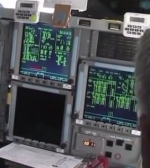
Another mystery: can anyone confirm in the attached picture that there is a red keyboard line AND a yellow keyboard line in CRT1? And if it's really true, how did they do that?

btw: source of the image https://www.youtube.com/watch?v=r0fnp-O1iGs
 

Attachments

  • CRT1.PNG
    CRT1.PNG
    257.2 KB · Views: 499
hi all. I cant compile the atlantis.2010 module using mcc+ visuals. i get 2 error

1>------ Build started: Project: SSUTruck, Configuration: Debug Win32 ------
2>------ Build started: Project: VAB, Configuration: Debug Win32 ------
3>------ Build started: Project: SSU_SLC6, Configuration: Debug Win32 ------
4>------ Build started: Project: Xenon_Lights, Configuration: Debug Win32 ------
5>------ Build started: Project: ssumeshc, Configuration: Debug Win32 ------
6>------ Build started: Project: Atlantis_MLP, Configuration: Debug Win32 ------
1>LINK : error LNK2001: unresolved external symbol __DllMainCRTStartup@12
1>D:\SSU\Orbitersdk\Space Shuttle Ultra\Debug\SSUTruck.dll : fatal error LNK1120: 1 unresolved externals
2>C:\Program Files (x86)\MSBuild\Microsoft.Cpp\v4.0\Microsoft.CppBuild.targets(990,5): warning MSB8012: TargetPath(D:\SSU\Orbitersdk\Space Shuttle Ultra\VAB\..\..\..\Modules\VAB.dll) does not match the Linker's OutputFile property value (D:\SSU\Modules\SSU_VAB.dll). This may cause your project to build incorrectly. To correct this, please make sure that $(OutDir), $(TargetName) and $(TargetExt) property values match the value specified in %(Link.OutputFile).
2>C:\Program Files (x86)\MSBuild\Microsoft.Cpp\v4.0\Microsoft.CppBuild.targets(992,5): warning MSB8012: TargetName(VAB) does not match the Linker's OutputFile property value (SSU_VAB). This may cause your project to build incorrectly. To correct this, please make sure that $(OutDir), $(TargetName) and $(TargetExt) property values match the value specified in %(Link.OutputFile).
3> Creating library ..\..\..\Modules\SSU_SLC6.lib and object ..\..\..\Modules\SSU_SLC6.exp
7>------ Build started: Project: Crawler, Configuration: Debug Win32 ------
3>LINK : warning LNK4098: defaultlib 'MSVCRT' conflicts with use of other libs; use /NODEFAULTLIB:library
8>------ Build started: Project: SSU_LCC, Configuration: Debug Win32 ------
2> Creating library ..\..\..\Modules\VAB.lib and object ..\..\..\Modules\VAB.exp
9>------ Build started: Project: Atlantis_Tank, Configuration: Debug Win32 ------
2>LINK : warning LNK4098: defaultlib 'MSVCRT' conflicts with use of other libs; use /NODEFAULTLIB:library
10>------ Build started: Project: Atlantis_SRB, Configuration: Debug Win32 ------
8> Creating library ..\..\Modules\SSU_LCC.lib and object ..\..\Modules\SSU_LCC.exp
4> Creating library ../../Modules/SSU_Xenon_Lights.lib and object ../../Modules/SSU_Xenon_Lights.exp
4>LINK : warning LNK4098: defaultlib 'MSVCRT' conflicts with use of other libs; use /NODEFAULTLIB:library
10> Creating library .\..\..\Modules/Atlantis_SRB.lib and object .\..\..\Modules/Atlantis_SRB.exp
10>LINK : warning LNK4098: defaultlib 'MSVCRT' conflicts with use of other libs; use /NODEFAULTLIB:library
4> Xenon_Lights.vcxproj -> D:\SSU\Orbitersdk\Space Shuttle Ultra\../../Modules/SSU_Xenon_Lights.dll
7> Creating library .\Debug\Crawler/Crawler.lib and object .\Debug\Crawler/Crawler.exp
7>LINK : warning LNK4098: defaultlib 'LIBCMT' conflicts with use of other libs; use /NODEFAULTLIB:library
3> SSU_SLC6.vcxproj -> D:\SSU\Orbitersdk\Space Shuttle Ultra\SLC6\..\..\..\Modules\SSU_SLC6.dll
8> SSU_LCC.vcxproj -> D:\SSU\Orbitersdk\Space Shuttle Ultra\..\..\Modules\SSU_LCC.dll
9> Creating library .\..\..\Modules/Atlantis_Tank.lib and object .\..\..\Modules/Atlantis_Tank.exp
9>LINK : warning LNK4098: defaultlib 'MSVCRT' conflicts with use of other libs; use /NODEFAULTLIB:library
2> VAB.vcxproj -> D:\SSU\Orbitersdk\Space Shuttle Ultra\VAB\..\..\..\Modules\VAB.dll
11>------ Build started: Project: Atlantis, Configuration: Debug Win32 ------
10> Atlantis_SRB.vcxproj -> D:\SSU\Orbitersdk\Space Shuttle Ultra\..\..\Modules\SSU_SRB.dll
9> Atlantis_Tank.vcxproj -> D:\SSU\Orbitersdk\Space Shuttle Ultra\..\..\Modules\SSU_Tank.dll
7> Crawler.vcxproj -> D:\SSU\Orbitersdk\Space Shuttle Ultra\..\..\Modules\SSU_Crawler.dll
11> Creating library .\..\..\..\Modules/MG_Atlantis.lib and object .\..\..\..\Modules/MG_Atlantis.exp
11>LINK : warning LNK4098: defaultlib 'LIBCMT' conflicts with use of other libs; use /NODEFAULTLIB:library
11>Atlantis.obj : error LNK2019: unresolved external symbol "public: __thiscall MechActuator::MechActuator(class AtlantisSubsystemDirector *,class std::basic_string<char,struct std::char_traits<char>,class std::allocator<char> > const &,double)" (??0MechActuator@@QAE@PAVAtlantisSubsystemDirector@@ABV?$basic_string@DU?$char_traits@D@std@@V?$allocator@D@2@@std@@N@Z) referenced in function "public: __thiscall Atlantis::Atlantis(void *,int)" (??0Atlantis@@QAE@PAXH@Z)
11>Atlantis.obj : error LNK2019: unresolved external symbol "public: void __thiscall MechActuator::SetObjectAnim(unsigned int)" (?SetObjectAnim@MechActuator@@QAEXI@Z) referenced in function "public: void __thiscall Atlantis::DefineAnimations(void)" (?DefineAnimations@Atlantis@@QAEXXZ)
11>..\..\Modules\SpaceShuttleUltra.dll : fatal error LNK1120: 2 unresolved externals
========== Build: 9 succeeded, 2 failed, 4 up-to-date, 0 skipped ==========

 
Do you mean Visual C++? If so, then which version? Are you opening the correct solution (sln) for your VC++ version?

Skickat från min SM-T210 via Tapatalk
 
yes visuals c++ i'm opening the ORBITER SDK atlantis 2010. i could relese the module while ago but now after some time i get errors. Any ideas what could be wrong?
 
I expect the 2013 version to have some problems, as there have been some file deletions and additions in the last week, and I can't update the project files for that version.
 
yes visuals c++ i'm opening the ORBITER SDK atlantis 2010. i could relese the module while ago but now after some time i get errors. Any ideas what could be wrong?
Have you checked out my Keeping an updated SSU installation thread here in the SSU sub forum?
 
yes i think i have everything that is required. I'm using MS visual 2010c++ with sp1 update installed. this is the result when i try to release the atlantis 2010. And i updated my SSU with tortoiseSVN

15> Creating library .\..\..\..\Modules/MG_Atlantis.lib and object .\..\..\..\Modules/MG_Atlantis.exp
15>LINK : warning LNK4098: defaultlib 'LIBCMT' conflicts with use of other libs; use /NODEFAULTLIB:library
15>Atlantis.obj : error LNK2019: unresolved external symbol "public: __thiscall MechActuator::MechActuator(class AtlantisSubsystemDirector *,class std::basic_string<char,struct std::char_traits<char>,class std::allocator<char> > const &,double)" (??0MechActuator@@QAE@PAVAtlantisSubsystemDirector@@ABV?$basic_string@DU?$char_traits@D@std@@V?$allocator@D@2@@std@@N@Z) referenced in function "public: __thiscall Atlantis::Atlantis(void *,int)" (??0Atlantis@@QAE@PAXH@Z)
15>Atlantis.obj : error LNK2019: unresolved external symbol "public: void __thiscall MechActuator::SetObjectAnim(unsigned int)" (?SetObjectAnim@MechActuator@@QAEXI@Z) referenced in function "public: void __thiscall Atlantis::DefineAnimations(void)" (?DefineAnimations@Atlantis@@QAEXXZ)
15>..\..\Modules\SpaceShuttleUltra.dll : fatal error LNK1120: 2 unresolved externals
========== Rebuild All: 13 succeeded, 2 failed, 0 skipped ==========
 
Another mystery: can anyone confirm in the attached picture that there is a red keyboard line AND a yellow keyboard line in CRT1? And if it's really true, how did they do that?

By simply letting both keyboards control the same display?

Remember, this thick yellow and red lines only indicate, which keyboards are controlling the display right now.
 
By simply letting both keyboards control the same display?

Remember, this thick yellow and red lines only indicate, which keyboards are controlling the display right now.

But that display, CRT 1, is only driven by IDP 1, which only "sees" the left keyboard, so in IDP 1 displays there should only be a red line (or no line). It's a similar situation with IDP 2, CRT 2 and the right keyboard but, IDP 3 sees both keyboards thus its displays can have both a red line and a yellow line (or one of them or none).
This could be a result of OI-34 changing/upgrading these systems.

---------- Post added at 11:57 PM ---------- Previous post was at 11:49 PM ----------

yes i think i have everything that is required. I'm using MS visual 2010c++ with sp1 update installed. this is the result when i try to release the atlantis 2010. And i updated my SSU with tortoiseSVN

15> Creating library .\..\..\..\Modules/MG_Atlantis.lib and object .\..\..\..\Modules/MG_Atlantis.exp
15>LINK : warning LNK4098: defaultlib 'LIBCMT' conflicts with use of other libs; use /NODEFAULTLIB:library
15>Atlantis.obj : error LNK2019: unresolved external symbol "public: __thiscall MechActuator::MechActuator(class AtlantisSubsystemDirector *,class std::basic_string<char,struct std::char_traits<char>,class std::allocator<char> > const &,double)" (??0MechActuator@@QAE@PAVAtlantisSubsystemDirector@@ABV?$basic_string@DU?$char_traits@D@std@@V?$allocator@D@2@@std@@N@Z) referenced in function "public: __thiscall Atlantis::Atlantis(void *,int)" (??0Atlantis@@QAE@PAXH@Z)
15>Atlantis.obj : error LNK2019: unresolved external symbol "public: void __thiscall MechActuator::SetObjectAnim(unsigned int)" (?SetObjectAnim@MechActuator@@QAEXI@Z) referenced in function "public: void __thiscall Atlantis::DefineAnimations(void)" (?DefineAnimations@Atlantis@@QAEXXZ)
15>..\..\Modules\SpaceShuttleUltra.dll : fatal error LNK1120: 2 unresolved externals
========== Rebuild All: 13 succeeded, 2 failed, 0 skipped ==========

Did you change anything? If so, you can undo those changes: right click in the trunk, TortoiseSVN > Revert... > select all and hit OK.
 
But that display, CRT 1, is only driven by IDP 1, which only "sees" the left keyboard, so in IDP 1 displays there should only be a red line (or no line). It's a similar situation with IDP 2, CRT 2 and the right keyboard but, IDP 3 sees both keyboards thus its displays can have both a red line and a yellow line (or one of them or none).
This could be a result of OI-34 changing/upgrading these systems.

Yeah, just checked this too - the location of the display hardware does not say which IDP is driving it (eg, in the top left MDU could be CRT3), but this one shows a 1.

What surprises me more is that the yellow bar is on the left of the IDP number. It should be on the right.
 
I know I'm going to be shot down, but there's no harm in asking: I found out that the drag chute covers are all in one mesh group so... is there a safe way to edit the VC mesh so I can separate that group into 6? Maybe manual editing?
:hide:
 
I know I'm going to be shot down, but there's no harm in asking: I found out that the drag chute covers are all in one mesh group so... is there a safe way to edit the VC mesh so I can separate that group into 6? Maybe manual editing?
:hide:

Changing the VC mesh? :uhh:
 
Changing the VC mesh? :uhh:

It isn't a real change, I don't need to have any vertices moved, it's just a reorganization, just taking the stuff in one group and moving them into separate groups. I've been looking at the numbers and it seems each cover is independent from each other, so it seems doable.
Now, I know that this mesh is big and has tons of stuff and that it has the habit of causing problems, so I'm not going to do anything against the better judgement of the people made/maintain this. I'm just proposing this because it seems simple enough that even I could make it by dragging the mesh into VS and "manually" edit it.
 
It isn't a real change, I don't need to have any vertices moved, it's just a reorganization, just taking the stuff in one group and moving them into separate groups. I've been looking at the numbers and it seems each cover is independent from each other, so it seems doable.
Now, I know that this mesh is big and has tons of stuff and that it has the habit of causing problems, so I'm not going to do anything against the better judgement of the people made/maintain this. I'm just proposing this because it seems simple enough that even I could make it by dragging the mesh into VS and "manually" edit it.

I agree. If Orbiter would play fair with this, I would even go so far to suggest a modularized VC made of small meshes that we can handle easier.
 
I agree. If Orbiter would play fair with this, I would even go so far to suggest a modularized VC made of small meshes that we can handle easier.

One mesh per panel would probably be easier to deal with (in the graphics side), and would allow a panel to have more than one version, for example panels O1, O2 and O3 were different between OV-102 and the rest of the fleet.
 
One mesh per panel would probably be easier to deal with (in the graphics side), and would allow a panel to have more than one version, for example panels O1, O2 and O3 were different between OV-102 and the rest of the fleet.

Exactly something like that. Also we don't need to worry about all animations, should one panel need editing. Maybe something like grouping the panels by their leading character for smaller numbers.
 
As long as it doesn't affect the orbiter, I don't see a problem.
 
As long as it doesn't affect the orbiter, I don't see a problem.
No it doesn't. The VC meshes are separate from the orbiter. The VC could do with revisit to match the orbiter in terms of accuracy.

Skickat från min SM-T210 via Tapatalk
 
Is this a to do before or after release ?
 
Is this a to do before or after release ?
In my mind it could be both, IE we start now and keep working on it as we go and find problems, just like any other part.

Skickat från min SM-T210 via Tapatalk
 
Status
Not open for further replies.
Back
Top