New Release D3D9Client Development

Ah! I remember I have read that some time ago (that's why I have a authors.map file laying around on my disk ;) )
That includes e-mail addresses (of jarmo an me)...I guess we have to get permission from each one of them to include that data, right?
 
An example to fix up the various Jarmo entries, you can create a ".mailmap" file in the repo root like so:
Code:
jarmonik <proper@mail> <jarmonik@c0f5cd98-1510-604a-8459-bf7538b8c9c2>
jarmonik <proper@mail> <[email protected]>

"git shortlog -sne" will then return:
Code:
   471  Kuddel <Kuddel@c0f5cd98-1510-604a-8459-bf7538b8c9c2>
   461  jarmonik <proper@mail>
    44  kuddel <kuddel@c0f5cd98-1510-604a-8459-bf7538b8c9c2>
     2  face <proper@mail>
     2  xyon <xyon@c0f5cd98-1510-604a-8459-bf7538b8c9c2>
     1  Felix24 <Felix24@c0f5cd98-1510-604a-8459-bf7538b8c9c2>

EDIT: obfuscated real emails a bit, the SVN thingies are BS, anyway.
 
Hmm I have to let that sink in a little bit ....

What makes me wonder is github again, should I add the "github noreply email", too?
...And is that the one I can find at "Account settings" -> "Emails" -> "Keep my email addresses private"?
...And do I have to check that checkbox there?

On github my name should be displayed as 'schnepe2' I guess, as 'kuddel' is someone else on github.

We might skip this to a time when we have nothing else to do ;)
Thanks again for the insights!
 
@jarmonik : To give me a break from fighting git(hub), I stepped back a bit and took a look at the D3D9Client sample add-ons.
GenericCamera MFD & DX9ExtMFD made heavy use of gcAPI, which has been removed from the git repository.
What is the plan with that API? Is the plan to add those to Orbiter API?
Orbiter (git) has not yet received changes for those, right?
 
@jarmonik : To give me a break from fighting git(hub), I stepped back a bit and took a look at the D3D9Client sample add-ons.
GenericCamera MFD & DX9ExtMFD made heavy use of gcAPI, which has been removed from the git repository.
What is the plan with that API? Is the plan to add those to Orbiter API?
Orbiter (git) has not yet received changes for those, right?
The old and obsolete gcAPI has been removed but the newer gcCore API remains. And those projects are already converted to use the gcCore.

It's likely that the Sketchpad2 &3 would need to be integrated to the Orbiter's Sketchpad interface. But is's too early to say much about the gcCore integration, probably not.
 
Are there any configuration steps necessary in order to build the D3D9 client using CMake? What I did was:
I have used the cmake-gui (graphical interface) which seems to work fine. I tried that "cmake ." from command line and it jammed just like you said. From where does it get the platform options, source and binary directories ? If the source and binary directories are the same then "copy folder" might end-up in a loop but that's just a wild guess.
 
Hey you git-experts out there:
As Jarmo moved the D3D9Client repository to git (including history ? ), is there a way to convert/change the subversion-authors afterwards?
Yeah, it would be nice to get that sorted out. Some of those user names might be from the CodePlex times.
 
I am trying to build the D3D9Client (64-bit) from the github repo (jarmonik/D3D9Client), but I am running into a problem

undeclared identifier 'gCameraPos' (in Common.hlsl)
Cannot open include file: 'gcAPI.h': No such file or directory (in MFDWindow.h and MFD.h)

gcAPI has been mentioned above, so I guess this is a known issue? Should I wait before trying to compile D3D9Client myself?
 
I am trying to build the D3D9Client (64-bit) from the github repo (jarmonik/D3D9Client), but I am running into a problem

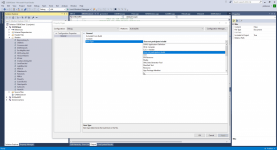
I have committed a fix that removes the dependency to gcAPI.h (something that I didn't notice earlier). For the other problem I have simply selected "does not participate in build" as shown in the screen shot. Those files are compiled during D3D9Client startup.
 

Attachments

  • build.png
    build.png
    124.7 KB · Views: 13
Is this declaration/definition in CMakeLists.txt O.K. this way?
Makefile:
set(DXSDK_DIR "C:/Program Files (x86)/Microsoft DirectX SDK (June 2010)")

I mean: The Visual-Studio-Projects 'till now assumed the environment variable DXSDK_DIR to be set to the correct location on a build machine.
I for example have one machine where the path differs:
Rich (BB code):
c:\>set
ALLUSERSPROFILE=C:\ProgramData
...
DXSDK_DIR=C:\Program Files (x86)\Microsoft SDKs\DirectX (June 2010)\
...
That's why I only referenced $(DXSDK_DIR) in the project files.

Is there something like (Note: NOT actual CMake syntax I believe ;) ):
Makefile:
if not set environment(DXSDK_DIR)
  set(DXSDK_DIR "C:/Program Files (x86)/Microsoft DirectX SDK (June 2010)") # default if not proper set in environment

# or

set(DXSDK_DIR extractFromEnvironmentOrDefault("%DXSDK_DIR%"  "C:/Program Files (x86)/Microsoft DirectX SDK (June 2010)"))
 
Last edited:
From searching the net I would guess something like this can do the job (although I have no idea what that CACHE INTERNAL thing is ;)
Makefile:
if (NOT "$ENV{DXSDK_DIR}" STREQUAL "")
    set(DXSDK_DIR)"$ENV{DXSDK_DIR}" CACHE INTERNAL "Copied from environment variable")
else()
    set(DXSDK_DIR "C:/Program Files (x86)/Microsoft DirectX SDK (June 2010)")
endif()
 
I have used the cmake-gui (graphical interface) which seems to work fine. I tried that "cmake ." from command line and it jammed just like you said. From where does it get the platform options, source and binary directories ? If the source and binary directories are the same then "copy folder" might end-up in a loop but that's just a wild guess.

So you were right -- CMake from the command line did end up in a copy loop of some sort: I wanted to delete my D3D9Client folder today, and got an error from the path being too deep. It turns out CMake from the command line created a (very very long) path like this:

Code:
D3D9Client\Orbitersdk\doc\doc\doc\doc\doc\doc\doc\doc\doc\doc\doc\doc\doc\doc\doc\doc\doc\doc\doc\doc\doc\doc\doc\doc\doc\doc\doc\doc\doc\doc\doc\doc\doc\doc\doc\doc\doc\doc\doc\doc\doc\doc\doc\doc\doc\doc\doc\doc\doc\doc\doc\...

I couldn't delete the tree with Windows, but I was able to finally delete it via rm -rf from Cygwin. I'll try building it with cmake-gui instead of the command line.
 
So you were right -- CMake from the command line did end up in a copy loop of some sort: I wanted to delete my D3D9Client folder today, and got an error from the path being too deep. It turns out CMake from the command line created a (very very long) path like this:
That problem should be fixed. I also had some difficulties deleting that. It's odd that there's no loop protection in CMake to prevent cases like this.
 
Last edited:
I mean: The Visual-Studio-Projects 'till now assumed the environment variable DXSDK_DIR to be set to the correct location on a build machine.
I tried to pass the $(DXSDK_DIR) environment variable to include libraries but the CMake got confused about it. So, I went the easy way-a-round by using set(DXSDK_DIR "C:/Program Files (x86)/Microsoft DirectX SDK (June 2010)") to move forward with my first attempt to use the CMake. Didn't want to get stuck on that too long.

This would look nice and simple if it works:
Makefile:
set(DXSDK_DIR extractFromEnvironmentOrDefault("%DXSDK_DIR%"  "C:/Program Files (x86)/Microsoft DirectX SDK (June 2010)"))
 
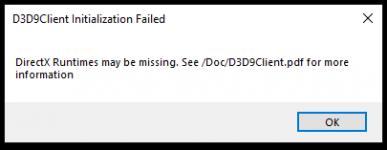
I have the x64 D3D9 client built and linked successfully now, but I'm having trouble running it from my x64 Orbiter install. I activated the module successfully, but it fails during load with this:

missing_dx_runtimes_Screenshot 2021-08-09 122411.png

I think it needs the 64-bit DX9 runtimes? I installed the runtimes from https://www.microsoft.com/en-us/download/confirmation.aspx?id=8109 listed in the D3D9 PDF, but I suspect those are just 32-bit. Is there a 64-bit package of the D3D9 runtimes I need to install?


EDIT:
My x64 orbiter.log shows this:
Code:
**** Orbiter.log
000000.000: Build Aug  9 2021 [v.210809]
000000.000: Timer precision: 1e-07 sec
000000.000: Found 0 joystick(s)
000000.000: Module AtlantisConfig.dll .... [Build 210809, API 210809]
000000.000: Module AtmConfig.dll ......... [Build 210809, API 210809]
000000.000: Module DGConfigurator.dll .... [Build 210809, API 210809]
000000.000: ---------------------------------------------------------------
000000.000: BaseDir    : D:\GitHub\orbiter\out\build\x64-Debug\
000000.000: ConfigDir  : D:\GitHub\orbiter\out\build\x64-Debug\Config\
000000.000: MeshDir    : D:\GitHub\orbiter\out\build\x64-Debug\Meshes\
000000.000: TextureDir : D:\GitHub\orbiter\out\build\x64-Debug\Textures\
000000.000: HightexDir : D:\GitHub\orbiter\out\build\x64-Debug\Textures2\ [[DIR NOT FOUND!]]
000000.000: ScenarioDir: D:\GitHub\orbiter\out\build\x64-Debug\Scenarios\
000000.000: ---------------------------------------------------------------
000000.000: D3D9 DLLs  : C:\WINDOWS\SYSTEM32\d3d9.dll [v 10.0.19041.928]
000000.000: ---------------------------------------------------------------
000000.000: Module D3D9Client.dll ........ [Build 210809, API 210809]
000000.000: Module XRSound.dll ........... [Build 210809, API 210809]
000000.000:
000000.000: **** Creating simulation session
000000.000: D3D9: [DirectX 9 Initialized]
000000.000: D3D9: [3DDevice Initialized]
 
Last edited:
I have the x64 D3D9 client built and linked successfully now, but I'm having trouble running it from my x64 Orbiter install. I activated the module successfully, but it fails during load with this:

I think it needs the 64-bit DX9 runtimes? I installed the runtimes from https://www.microsoft.com/en-us/download/confirmation.aspx?id=8109 listed in the D3D9 PDF, but I suspect those are just 32-bit. Is there a 64-bit package of the D3D9 runtimes I need to install?

But you were able to run the x64 binary package (release and debug) I posted a week ago, right ? Maybe you are trying to link it to some other version ?
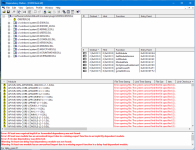
You could check the dependencies and see if you have the necessary files in /System32/ and just in case /SysWOW64/

I am no expert in building x64 but why do all paths lead to /System32/ and not in /SysWOW64/ there are plenty of d3d9 related DLL's there ?

Also any ideas why the forum scales down attached images ? They become next to unreadable and the file size increases. (Original size 24 kb now it's over 10x bigger)
 

Attachments

  • depends.png
    depends.png
    357.9 KB · Views: 9
I am no expert in building x64 but why do all paths lead to /System32/ and not in /SysWOW64/ there are plenty of d3d9 related DLL's there ?
I'm no Windows expert but from what I can gather, SysWOW64 is where Windows x64 stores all of its x86 system files, so it analogous to C:\Program Files (x68) that 32-bit programs default to C:\Program Files (x68) while 64-bit programs go into C:\Program Files.
 
WOW64 means [W]indows [O]n [W]indows-[64], so in that folder the 32bit world lives - logical, right?

Back to the "missing runtimes": I don't remember having installed special x64 DirectX runtimes. I guess the installer was aware of being run on a 64-bit system and did the right thing.
The check at D3D9Client startup might not be 100% accurate, though - It was developed when there was ONLY a 32bit Orbiter!
I'll take a look at that code section.
 
But you were able to run the x64 binary package (release and debug) I posted a week ago, right ? Maybe you are trying to link it to some other version ?
You could check the dependencies and see if you have the necessary files in /System32/ and just in case /SysWOW64/

Yes, both the Release and Debug binary packages run fine for me. I checked the Orbiter.log from that instance, and the DLLs that work are:

Code:
    000000.000: D3D9 DLLs  : C:\WINDOWS\SYSTEM32\d3d9.dll [v 10.0.19041.928]
    000000.000:            : C:\WINDOWS\SYSTEM32\d3dx9_43.dll [v 9.29.952.3111]

In the version that I built, though, Orbiter.log only shows the first DLL:

Code:
000000.000: D3D9 DLLs  : C:\WINDOWS\SYSTEM32\d3d9.dll [v 10.0.19041.928]

It could be due to me manually installing the D3D9 client files -- most of the files (except for the newly built DLL, of course) I took from the 32-bit D3D9 zip package. I will dig into that more tonight.

EDIT:
I got it to work like this:
  1. Extract the OrbiterX64-dbg-bin_with_D3D9.zip binary package from Jarmonik into my orbiter\out\build\x64-Debug folder.
  2. Copy my newly built x64 D3D9Client.dll into orbiter\out\build\x64-Debug\Modules\Plugin, overwriting the DLL that was there.
  3. Rebuild the Orbiter x64 target in VS 2019.

So the root issue was probably some D3D9 config files that I manually copied over incorrectly the first time.
 
Last edited:
Back
Top