
General Question Hide the HUD completely

Adrian

New member
Joined
Jan 27, 2025
Messages
18
Reaction score
3
Points
3
Location
Germany
Hey everyone,

I am very new to this forum and to Orbiter, so I am very sure this is a simple fix. I installed the Soyuz TMA by Thorton and Igel. While getting to grips with it, I noticed that there is no alternative cockpit available when pressing F8, but instead the Display on the HUD can be switched which looks like this:
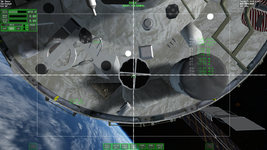
Screenshot (26).png
I think that looks really weird with the default HUD Elements also included.

Is there any easy way to hide this HUD? In the Doc I found out how to change the color, how to switch mode, but not how to simply hide it...

Thanks in advance!

Adrian
 
Hi there!

I'm not sure, but I think that the default HUD elements, attitude modes, etc, always show up in the default view mode... the vessel would need to have a 2d or virtual cockpit mode to not show those.
 
Hey everyone,

I am very new to this forum and to Orbiter, so I am very sure this is a simple fix. I installed the Soyuz TMA by Thorton and Igel. While getting to grips with it, I noticed that there is no alternative cockpit available when pressing F8, but instead the Display on the HUD can be switched which looks like this:

View attachment 41967
I think that looks really weird with the default HUD Elements also included.

Is there any easy way to hide this HUD? In the Doc I found out how to change the color, how to switch mode, but not how to simply hide it...

Thanks in advance!

Adrian
Hi Adrian, welcome to the forum.

I don't have Soyuz TMA myself so don't know if this will work, but the generic way to disable HUD completely is ctrl + H or just H.
You will lose all annotations too, so not sure if this is what you want, and default items will remain like GLS said.

Happy Orbiting !
 
Last edited:
Hi Adrian, welcome to the forum.

I don't have Soyuz TMA myself so don't know if this will work, but the generic way to disable HUD completely is ctrl + H or just H.
You will lose all annotations too, so not sure if this is what you want, and default items will remain like GLS said.

Happy Orbiting !
Hey,

thanks for the warm welcome!
ctrl+H doesn´t seem to remove everything, the autopilot controls are still there, and you can still see the fields where you can open the MFDs.
Seems like its not such a quick fix after all...
 
Hi there!

I'm not sure, but I think that the default HUD elements, attitude modes, etc, always show up in the default view mode... the vessel would need to have a 2d or virtual cockpit mode to not show those.
Hey,

thanks I guessed as much.
I hope I can get the Soyuz HUD elements added to a 2d cockpit, but its quite a daunting task for me.

Do you know any resources I could look at beyond the default documentation concerning MFD modding and 2D cockpit modding?
 
Hey,

thanks I guessed as much.
I hope I can get the Soyuz HUD elements added to a 2d cockpit, but its quite a daunting task for me.

Do you know any resources I could look at beyond the default documentation concerning MFD modding and 2D cockpit modding?

If the source code of that addon is not available, you cannot do much... 🤷‍♂️
If it is, well the help in the Orbiter Developer Manual might not be enough but you can always look at the source code of the Delta Glider, and other vessels that come with Orbiter, and see how something was done.

Anyway, if Soyuz is your thing, this might interest you https://www.orbiter-forum.com/threads/soyuz-7k-t-custom.40189/
 
If the source code of that addon is not available, you cannot do much... 🤷‍♂️
If it is, well the help in the Orbiter Developer Manual might not be enough but you can always look at the source code of the Delta Glider, and other vessels that come with Orbiter, and see how something was done.

Anyway, if Soyuz is your thing, this might interest you https://www.orbiter-forum.com/threads/soyuz-7k-t-custom.40189/
Alright thanks, seems like the source code is not available.

I saw the 7k mod already, it looks really great but unfortunately I need to simulate the TMA variant so that doesn´t help me. But thank you for the suggestions.
 
Back
Top