Discussion TileEdit on Windows development thread

Matias Saibene

Developing and CMakin'
Donator
Joined
Jul 7, 2012
Messages
1,519
Reaction score
1,542
Points
128
Location
Monte Hermoso - Argentina
Website
github.com
Preferred Pronouns
he/him
Hello Orbiter friends.
This thread will cover compiling the TileEdit utility on Windows, its development, and bug fixes.

For those who don't know this:
tileedit is a texture tile viewer and editor for Orbiter Space Flight Simulator.
It can be used to navigate the quadtree texture layers for planetary surface rendering introduced in Orbiter 2016. It also contains some rudimentary editing capabilities for elevation tiles.
tileedit is written in C++ and based on Qt to provide the user interface. The previous Matlab-based implementation is now obsolete and retained for reference.

Author: Martin Schweiger
 
Hi Matias

I remember using TileEdit a few years ago :
- first to flatten the entire area of the Kourou Space Center :
at the time, the Flatten option in D3D9 didn't exist...
- then, few years later, to create the "hole" fot the ELS (the Soyuz launch site in Kourou).

I remember having a lot of difficulties : numerous bugs, crashes, and other frustrating behaviors. o_O

I did manage to achieve roughly what I wanted, though. 🥵
But I must say that I don't enjoy using this utility, even though the concept is good.

So if you release an update, I would be very happy, and I congratulate you for your work !
 
Hi Matias

I remember using TileEdit a few years ago :
- first to flatten the entire area of the Kourou Space Center :
at the time, the Flatten option in D3D9 didn't exist...
- then, few years later, to create the "hole" fot the ELS (the Soyuz launch site in Kourou).

I remember having a lot of difficulties : numerous bugs, crashes, and other frustrating behaviors. o_O

I did manage to achieve roughly what I wanted, though. 🥵
But I must say that I don't enjoy using this utility, even though the concept is good.

So if you release an update, I would be very happy, and I congratulate you for your work !
You were using the MatLab-based TileEdit, right?
I have used the Qt-based TileEdit and have had no problems on Linux.
 
Hi Orbiter friends interested in TileEdit:
After a long day of work, I managed to compile TileEdit on Windows 11. However, I had to take an alternative route, using MSYS2 to compile instead of MSVC.

If you have the opportunity, please try this release and let me know how it works. Any feedback is welcome.

To avoid overloading OrbiterForum's servers, I preferred to upload it to GitHub releases.
https://github.com/MatiasSaibene/orbiter-tileedit-qt/releases/tag/pre-Release1

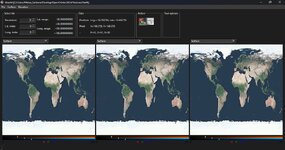
When you open it, you'll see something like this:
Captura de pantalla 2025-12-19 235058.jpg
 
Last edited:
Thx, great addition, for sure! it will help level bases or dig structures under them. Pretty sure I will use it :)

I'm interested in CLI-only compilation --> Can you provide compilation command lines for both targets Linux and Win11(Win10?)?

(EDIT) Reporting some issues:

On Windows 10, the GUI is fine and I could open and display "Earth" folder. Then, the navigation in the tiles seams quiet erratic: the Action button "Navigate" is selected but a click in the picture, either zooms in but not at the click location or centers the display to another location without zooming in. Hard to express clearly, but can you detail how the navigation interface should work.

On Ubuntu (22.04.5), after extracting from the downloaded Zip, running tileedit seems to extract its own archive from somewhere but it fails. So no try of the GUI so far.

Also, sorry to bother with licenses but I don't think it is a detail. Your readme.md states "Author: Martin Schweiger \n tileedit is licensed under the GNU General Public License Version 3. See file "COPYING" for details." But MIT was originally chosen by Martin Schweiger (more permissive, also valid for tileedit?). Is GNU GPL for your own implementation (C++, not Matlab...)? Actually, I'm totally fine with GPL for tileedit, of course, but need to understand how the licenses work.
 
Last edited:
Windows 10 test:
Runs ok and loads the textures of the corresponding planet just fine.
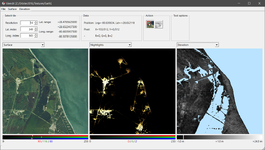
1766224334951.png

Missing the navigation arrows and "X" in the middle to zoom back out. If you know where to press, you can navigate the map just fine, but it would be better to bring back the previous style which was very intuitive. (highlight quadrant to zoom, arrows on the edges to navigate and "X" in the middle to zoom out). The Elevation config popup works and all the colourmaps displayed just fine.

In a future release, it would be fantastic to be able to have the same features for all types of tiles:
Surface -> Export to image / Import from image --right now you can only import
Elevation -> Export to image / Import from image --works
Night lights/Watermask -> Export to image / Import from image --currently not supported
 
Thank you all so much for your tests!
Thx, great addition, for sure! it will help level bases or dig structures under them. Pretty sure I will use it :)

I'm interested in CLI-only compilation --> Can you provide compilation command lines for both targets Linux and Win11(Win10?)?
Excellent idea, I'm going to make a post specifying just that.

On Windows 10, the GUI is fine and I could open and display "Earth" folder. Then, the navigation in the tiles seams quiet erratic: the Action button "Navigate" is selected but a click in the picture, either zooms in but not at the click location or centers the display to another location without zooming in. Hard to express clearly, but can you detail how the navigation interface should work.
Yes, the navigation is quite strange right now. But I think that's because the mode for using four tiles is selected instead of zooming to a single tile. I'll explain this in a new post in this thread.

On Ubuntu (22.04.5), after extracting from the downloaded Zip, running tileedit seems to extract its own archive from somewhere but it fails. So no try of the GUI so far.
This particular release is only for Windows. I'll have the Linux release soon, but the osgearth package is broken in the AUR, and I use Manjaro to compile it. I might install it on a Debian machine, which is more similar to Ubuntu (especially in terms of packaging and dependencies).

Also, sorry to bother with licenses but I don't think it is a detail. Your readme.md states "Author: Martin Schweiger \n tileedit is licensed under the GNU General Public License Version 3. See file "COPYING" for details." But MIT was originally chosen by Martin Schweiger (more permissive, also valid for tileedit?). Is GNU GPL for your own implementation (C++, not Matlab...)? Actually, I'm totally fine with GPL for tileedit, of course, but need to understand how the licenses work.
No problem, thanks for reminding me. I forgot to upload the COPYING file to the repository.
I am indeed a bit confused because the original Orbiter repository (https://github.com/orbitersim/orbiter) is MIT, but TileEdit is GPL-3.0. And I forked it from @martins GPL repository (https://github.com/mschweiger/orbiter-tileedit).

EDIT: Done! I've added the corresponding COPYING.

Windows 10 test:
Runs ok and loads the textures of the corresponding planet just fine.
View attachment 46283

Missing the navigation arrows and "X" in the middle to zoom back out. If you know where to press, you can navigate the map just fine, but it would be better to bring back the previous style which was very intuitive. (highlight quadrant to zoom, arrows on the edges to navigate and "X" in the middle to zoom out). The Elevation config popup works and all the colourmaps displayed just fine.
I'm a bit lost there because I wasn't at all familiar with the previous implementation (MatLab). But I'll have to look into it. It's been a while since I've dabbled in Qt programming.

In a future release, it would be fantastic to be able to have the same features for all types of tiles:
Surface -> Export to image / Import from image --right now you can only import
Elevation -> Export to image / Import from image --works
Night lights/Watermask -> Export to image / Import from image --currently not supported
I'll have to figure out a way to do that and implement it. Sounds like a good idea!

Thank you all for your help and patience. I'll try to have the initial documentation or quick start guide ready today.

And remember, testing is the future, and the future starts with you (Portal2 reference).
 
So I downloaded the zip file, then unzipped it into a folder.

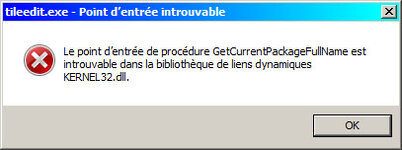
I ran the tileedit.exe file and here's what I got :

tiledit.jpg
In english :
The procedure entry point GetCurrentPackageFullName could not be located in the dynamic link library KERNEL32.dll

I'm using Windows 7. (and french version of course).
Could that be the reason? Win7 too old ?
 
So I downloaded the zip file, then unzipped it into a folder.

I ran the tileedit.exe file and here's what I got :

View attachment 46291
In english :
The procedure entry point GetCurrentPackageFullName could not be located in the dynamic link library KERNEL32.dll

I'm using Windows 7. (and french version of course).
Could that be the reason? Win7 too old ?
Yes, absolutely. I'm programming in and for Windows 11 and a lot has changed since then.
And while I can install Windows 7, I'm not sure if Qt6 will work on Windows 7.
I recommend upgrading to Windows 11 24H2 if possible; I have it installed and it's the last version before they added the dreaded AI.

If you want to switch to Linux, I have to warn you that there aren't many add-ons available for Orbiter Linux, although I might be able to get TileEdit working (I've done it before). In that case, I recommend Debian 13; it's the most vanilla version you can find. Or, if not, Linux Mint.
 
Yes, absolutely. I'm programming in and for Windows 11 and a lot has changed since then.
Hi Matias :cheers:

I kind of suspected as much... 😅

So no, sorry, but I'm keeping my old Windows 7 as long as my computer is working fine...
It's more than enough for me to use Orbiter and create add-ons. ;)

The day my computer dies, I'll upgrade to Windows 11 (or 12 or 13 or...) but I'll buy a system capable of running Microsoft Flight Simulator 2024 (or 26 or 28).

I'll keep your "tiledit" file for... later! :hailprobe:
 
Hi Matias :cheers:

I kind of suspected as much... 😅

So no, sorry, but I'm keeping my old Windows 7 as long as my computer is working fine...
It's more than enough for me to use Orbiter and create add-ons. ;)

The day my computer dies, I'll upgrade to Windows 11 (or 12 or 13 or...) but I'll buy a system capable of running Microsoft Flight Simulator 2024 (or 26 or 28).

I'll keep your "tiledit" file for... later! :hailprobe:
Well, no problem!

However, before your computer dies, you can try Linux. Even on a USB stick.
Remember that Windows 7 no longer receives updates as frequently as before, so make sure you have good security software.

EDIT: I'm not promising anything, but I'll probably try to compile TileEdit for Windows 7. For old times' sake.
 
How to compile TileEdit on Windows using MSYS2:

1. Download and install MSYS2 from the official website:

https://www.msys2.org/#installation

2. In the Start Menu, click on MSYS2 UCRT64, which has this yellow icon:

ucrt64.png

3. The Bash shell will open. Once open, we will begin updating the entire MSYS2 system.

3.1. Run the following command to update the pacman database (PACkage MANager):

Bash:
pacman -Syyu

And answer the terminal questions by typing Y and pressing ENTER, for YES.

3.2 - Once everything is updated, we will install the necessary packages to compile TileEdit correctly:

Bash:
pacman -Syu git mingw-w64-ucrt-x86_64-OpenSceneGraph mingw-w64-ucrt-x86_64-cmake mingw-w64-ucrt-x86_64-geos mingw-w64-ucrt-x86_64-make mingw-w64-ucrt-x86_64-osgearth mingw-w64-ucrt-x86_64-qt-creator mingw-w64-ucrt-x86_64-qt6-base mingw-w64-ucrt-x86_64-qt6-declarative mingw-w64-ucrt-x86_64-qt6-quick3d mingw-w64-ucrt-x86_64-qt6-serialport mingw-w64-ucrt-x86_64-qt6-shadertools mingw-w64-ucrt-x86_64-qt6-svg mingw-w64-ucrt-x86_64-qt6-tools mingw-w64-ucrt-x86_64-qt6-translations

4. Now we're going to clone the orbiter-tileedit-qt GitHub repository using the MSYS2 Git program.

4.1. In the same MSYS2 UCRT64 console, run the following command:

Bash:
git clone https://github.com/MatiasSaibene/orbiter-tileedit-qt.git

4.2.- Next, we change to the directory where the source code is located using the command:

Bash:
cd "orbiter-tileedit-qt\Windows_MSYS2"

4.3.- Next, we generate the compilation files with CMake:

Bash:
cmake -B build -S . -G "MinGW Makefiles" -DCMAKE_BUILD_TYPE=Release

4.4.- Next, we compile the source code with the command:

Bash:
cmake --build build --parallel

4.5 - Next, we change to the directory where the TileEdit executable is located:

Bash:
cd build/src/

4.6 - Now we will copy the necessary DLL libraries for TileEdit to function, using this command:
Remember to enter the entire command block exactly as it appears here:

Bash:
cp /c/msys64/ucrt64/bin/Qt6Core.dll \
   /c/msys64/ucrt64/bin/Qt6Gui.dll \
   /c/msys64/ucrt64/bin/Qt6Widgets.dll \
   /c/msys64/ucrt64/bin/libb2-1.dll \
   /c/msys64/ucrt64/bin/libbrotlicommon.dll \
   /c/msys64/ucrt64/bin/libbrotlidec.dll \
   /c/msys64/ucrt64/bin/libbz2-1.dll \
   /c/msys64/ucrt64/bin/libdouble-conversion.dll \
   /c/msys64/ucrt64/bin/libfreetype-6.dll \
   /c/msys64/ucrt64/bin/libgcc_s_seh-1.dll \
   /c/msys64/ucrt64/bin/libglib-2.0-0.dll \
   /c/msys64/ucrt64/bin/libgraphite2.dll \
   /c/msys64/ucrt64/bin/libharfbuzz-0.dll \
   /c/msys64/ucrt64/bin/libiconv-2.dll \
   /c/msys64/ucrt64/bin/libicudt78.dll \
   /c/msys64/ucrt64/bin/libicuin78.dll \
   /c/msys64/ucrt64/bin/libicuuc78.dll \
   /c/msys64/ucrt64/bin/libintl-8.dll \
   /c/msys64/ucrt64/bin/libmd4c.dll \
   /c/msys64/ucrt64/bin/libpcre2-16-0.dll \
   /c/msys64/ucrt64/bin/libpcre2-8-0.dll \
   /c/msys64/ucrt64/bin/libpng16-16.dll \
   /c/msys64/ucrt64/bin/libstdc++-6.dll \
   /c/msys64/ucrt64/bin/libwinpthread-1.dll \
   /c/msys64/ucrt64/bin/libzstd.dll \
   /c/msys64/ucrt64/bin/zlib1.dll \
   .

4.7.- Next, we create the platforms folder like this:

Bash:
mkdir -p platforms

4.8 - And finally, we copy the qwindows.dll library into the platforms folder:

Bash:
cp "C:\msys64\ucrt64\share\qt6\plugins\platforms\qwindows.dll" ./platforms/

4.9.- Our executable tileedit.exe will be located in orbiter-tileedit-qt\Windows_MSYS2\build\src and from there we can open it.

5.- Test and enjoy!

 
Last edited:
Back
Top