Question Real topography using Orulex

4throck

Enthusiast !
Joined
Jun 19, 2008
Messages
3,502
Reaction score
1,012
Points
153
Location
Lisbon
Website
orbiterspaceport.blogspot.com
I've been trying to get real topography in Orbiter by using Orulex and level 8 heightmaps.

By manipulating the configuration, namely the planetary function, I'm able to minimize the random terrain to the point were it is non intrusive with regard to the real details but the surface still seems interesting an not too smooth.

Also, by reducing the planetary radius to the minimal altitude point, I'm able to solve the below sphere problem. If I move the bases to the lowest points it becomes perfect!

So some questions for the community:

» Is there any interest in accurate and real terrain in Orbiter, (even if low quality) for bodies other than Earth, Mars and Moon?
» Is someone else willing to help with base relocation to lowest points and perhaps create some scenarios?


Another thing: I've tried with no success to get a BMP grayscale altimetry image into Orulex, but II always get a flat planet.

The source image is this:
ismap_Z16.jpg


The documentation is not very detailed about the resolution or bit depth required, if the file name needs to be complete along with the .bmp extension, etc. What I really need the config line that load a BMP as global terrain. I can manage the rest on my own.
 
Last edited:
Please please please! I'd love to see Orulex with some proper looking heights, but haven't the foggiest idea of how it all works.

It's pretty cool now already, but I hate the massive craters you get with bases. This sounds like that problem would disappear... :thumbup:
 
Is there any interest in accurate and real terrain in Orbiter, (even if low quality) for bodies other than Earth, Mars and Moon?

Do we actually have topographical data about other bodies?

Another thing: I've tried with no success to get a BMP grayscale altimetry image into Orulex, but II always get a flat planet.

ORULEX uses its own heightmap format. If I'm not wrong you can create and edit heightmaps in worldstudio.
 
If I'm not wrong you can create and edit heightmaps in worldstudio.
That was a planned feature that never materialized.

The format of hei files is simple - first width and height as 32bit unsigned ints, then array of altitudes as 16bit signed ints, with 0 as ground level.

I never got a consistent request for a converter (BMP files are acceptable natively by Orulex), with description of source format to be converted from, therefore it does not exist.


About below sphere stuff - better to reduce the radius of the planet than to shift the terrain up, since that would change the local gravity (undetectable levels perhaps, but would throw realistic missions off by a few seconds).

Oh, and what other planets than Moon, Mars, Venus and Earth need real topography? If none, what's wrong with one i provided?
 
So, there's no fixed resolution for the world heightmap files, right? The reason I'm asking is that the Mars heightmap at ORBIDES site is all zeroes, and my attempts to transfer MOLA data have been interrupted by real-life work...
 
Art, your heightmaps are perfect, that's not my point.

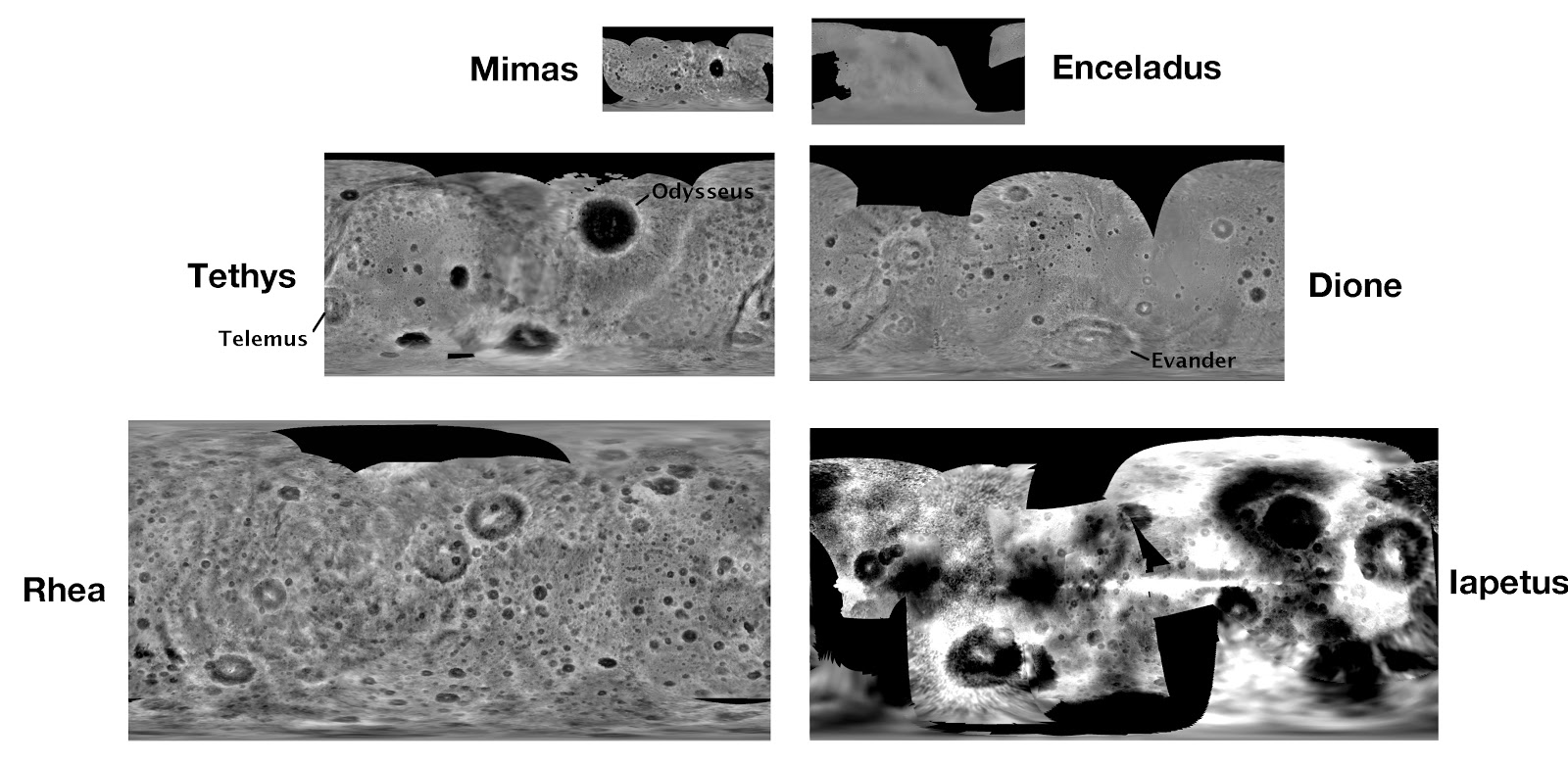
We have altimetric information for Venus (low res but accurate) and if you look here http://stereomoons.blogspot.com/ there are more bodies available.

See here:


xsmap_Z-55-poster-X.jpg

I've already contacted Dr. Paul Schenk and in principle there's no problem is using his data for Orbiter. He has other bodies covered, such as Io, but let's not get ahead of ourselves.

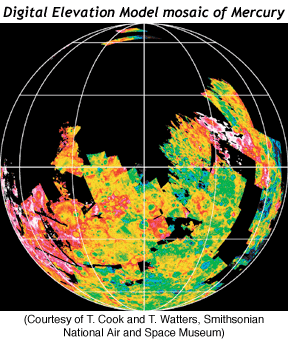
Also, there's some data regarding Mercury:

MercuryDEM.gif


What I need is to be able configure Orulex to read a grayscale BMP as height.
No need for a converter, because the datasets will be limited to something like the image I posted above. Of course, areas with missing data exist, but at least we'd have the major craters and mountains to navigate around :)

I've tried with:

//heightmap =--------------file name-----------------|lower lat|upper lat|west lon|east lon| scale |O|F|U

heightmap=iapetus|-90|90|-180|180|100|2|0|0

What is the scale parameter ? It's something like pixel value * scale = meters ?

Any help would be appreciated!
 
Last edited:
It's pretty cool now already, but I hate the massive craters you get with bases. This sounds like that problem would disappear... :thumbup:

Go directly to the .cfg files in your Orbiter/Terrain folder and open the planet or moon of your choice. There is a setting there for "sbcrater" that governs the ridge height around bases. I find setting it to 10 gives a slight bump which doesn't look too bad.

I think the World Editor gives the impression that this can be set specifically for each base, but I think this is a feature not implemented, or at least I can't figure it out. So the changes are going to be planetwide. However, if I am remembering correctly (can't open Orbiter to check right now) you *can* use the World Editor to set the crater radius per base, which when combined with a low ridge height can give a reasonably realistic look.
 
Ok, got it. The answer was fixed lenght fields :)! It was mentioned on Orulex docs but I got confused with decimal values.

My first tests are promising. The Venus data has few datapoints, so the altimetry data by itself is not spectacular. Iapetus, being smaller, really comes alive.

iapetus.jpg


venus.jpg


Now it's time to get the vertical scale right and to find the right mix between random and real terrain,
 
Rather than generating the terrain on the fly from the height-map data, why don't you run MATLAB's bi-cubic interpolation to some arbitrary resolution.

You could then add in erosion and and cratering noise in preprocessing.

Gigabytes are cheaper than GigaFLOPS.
 
Here are some better results. I'm using moderate random terrain over which real topography is added. Vertical scale is adjusted real values. The only problem I've found so far is that some of the surface textures are displaced in some areas with relation to the altimetry data. On those areas the realism is lower, but I'm pleased with the results so far. Iapetus is quite stunning!

Dione:

dione.jpg


Iapetus:

iapetus.jpg


Rhea:

rhea.jpg
 
Back
Top